
Add draft products to a member's order
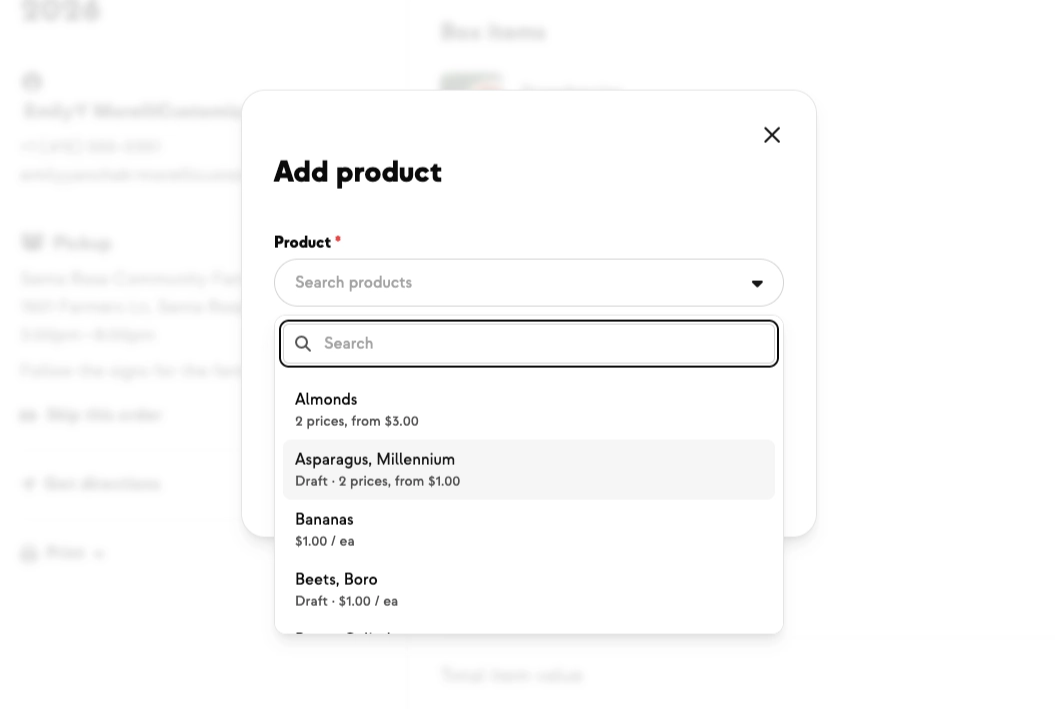
A product you're staging before launch. A variant you pulled from sale mid-season. A specialty or comped item you'd rather not offer to everyone. Until now, the only way to get one of those onto a member's order was to publish it, add it, and unpublish it again — fiddly, and it briefly put the item in front of customers.
Now the "Add product" search inside an order includes draft products and variants right alongside published ones. A "Draft" tag marks a draft product in the search results, and a "(Draft)" marker appears next to a draft variant once you pick the product, so there's never any guessing about what you're adding.
Adding a draft item to an order doesn't publish it or change its status in the shop — your customers still only ever see published items. Archived products and variants stay hidden from the search, just as before.
New on Farmhand


Your farm is growing.
Your platform should keep up.
Our roadmap is built from farmer conversations, not corporate planning cycles. You ask. We build. You see it live.